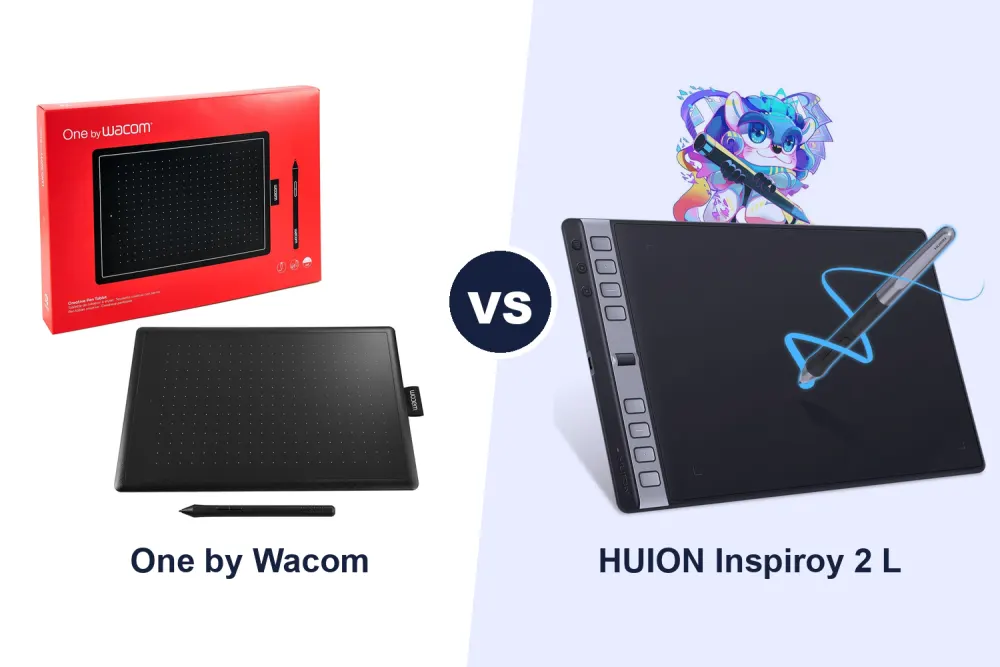
We compared two pen tablets for digital drawing: the One by Wacom (Medium) and the HUION Inspiroy 2 L.
What we looked at
Working area, express keys and controls, pen pressure sensitivity, compatibility, and price.
The verdict
If you want a simple, well-known Wacom pen tablet with a battery-free pen, the One by Wacom Medium is the straightforward pick, at £70.07. If you would rather pay £29.92 more for a larger 10.5 x 6.56-inch working area with up to 24 customisable express keys (via group keys), a scroll wheel and 8192 levels of pen pressure, the HUION Inspiroy 2 L is the more configurable option, at £99.99.

A £70.07 Medium Wacom pen tablet with a battery-free pen included.

A £99.99 large tablet with up to 24 customisable keys and 8192 levels of pen pressure.
One by Wacom Medium, Pen Tablet, incl. battery-free Wacom Pen 2K — Best Value
Intended for: Marketed as a precise Medium pen tablet with a USB connection, requiring a PC (Windows 7, 8.1, 10 or Mac OS X 10.10 or later) and an internet connection to download the driver, including a battery-free Wacom Pen 2K.
What we liked
- Well-known Wacom brand, widely used for sketching and e-learning
- Battery-free Wacom Pen 2K included
- Simple USB connection
- Compact Medium size for a tidy desk setup
Worth knowing
- Costs £29.92 less than the HUION but with a smaller, unstated working area and fewer stated express keys
- Needs an internet connection to download the driver before use, per the listing
Best for
- Beginners who want a simple, well-known brand
- E-learning and basic sketching
- Buyers who want the lower price
Not ideal for
- Anyone who wants the largest working area
- Buyers who want many customisable express keys
HUION Inspiroy 2 Large Drawing Tablet with 3-Group 8 Customized Express Key — Most Configurable
Intended for: Marketed as a large drawing tablet with a 10.5 x 6.56-inch working area, 3-group customisable express keys (expandable from 8 to 24 via group keys) plus a scroll wheel, the PW110 pen with HUION PenTech 3.0 and 8192 levels of pressure sensitivity, and ±60-degree tilt function, compatible with Windows, Mac, Linux, Android and Chrome.
What we liked
- Larger 10.5 x 6.56-inch working area than the One by Wacom, per the listing
- Group keys expand express keys from 8 to 24, per the listing
- 8192 levels of pen pressure sensitivity
- ±60-degree tilt function for more natural lines
- Broad compatibility including Android and Chrome, per the listing
Worth knowing
- Costs £29.92 more than the One by Wacom on these listings
- More buttons and controls may be more than a beginner needs
Best for
- Buyers who want a larger working area
- Anyone who wants many customisable express keys
- Digital artists who want tilt-sensitive pen input
Not ideal for
- Buyers who want the simplest, lowest-cost setup
- Anyone who wants the smallest tablet for a compact desk