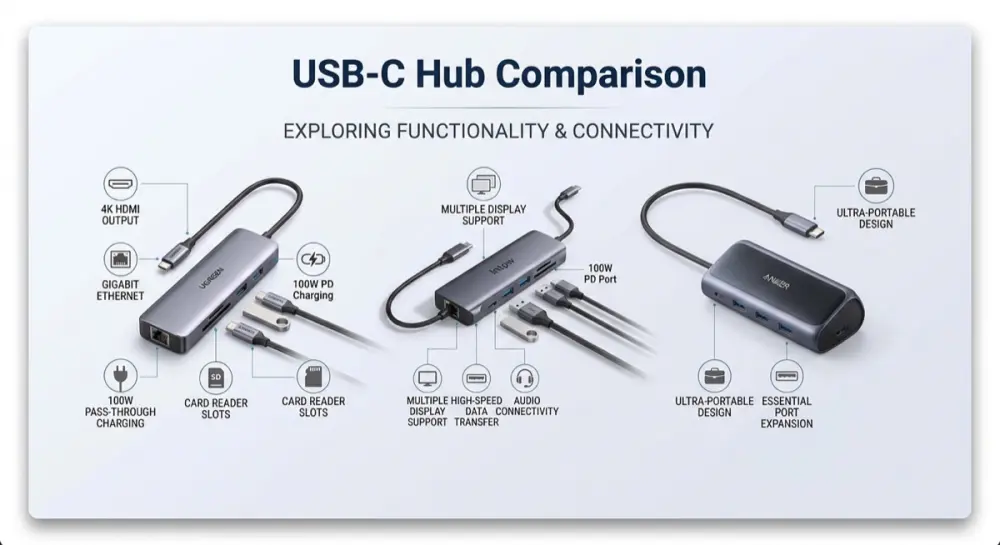
We compared spec sheets for three USB-C hubs that take different approaches to the same problem: adding display, data, and power ports to a modern laptop.
What we looked at
Port count and mix, HDMI output count and refresh rate, data transfer speeds, power delivery wattage, and listed device compatibility.
The verdict
If you run dual external monitors, the UGREEN Revodok Pro's two HDMI outputs at 4K@60Hz are the only option here that supports it. If you want the most ports for the money — including Ethernet and a card reader — the Intpw 10-in-1 covers the most ground, though two of its USB-A ports step down to USB 2.0 speeds. If you'd rather have a compact, single-monitor hub from an established brand, the Anker 332 trades port count and dual-HDMI for simplicity and the widest listed device compatibility across MacBook, iPad, and Windows laptops.

The only hub of the three with two HDMI outputs at 4K@60Hz — the clear pick for a genuine dual-monitor desk setup.
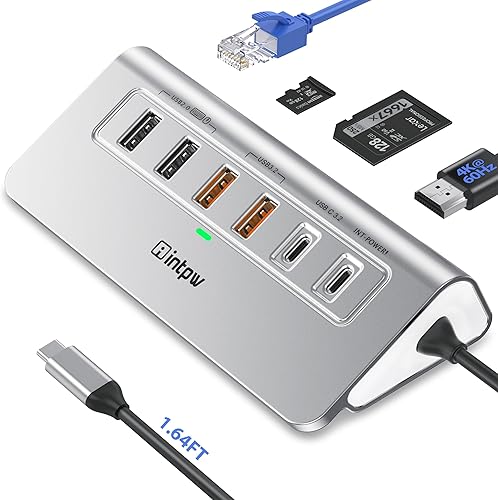
The highest port count here, adding Ethernet and a card reader the other two skip — though two of its USB-A ports are slower USB 2.0, and it's the cheapest of the three.

A compact 5-in-1 from an established brand, trading port count and dual-HDMI for simplicity and the widest listed device compatibility.
UGREEN Revodok Pro 7-in-1 USB-C Hub — Best for Dual Monitors
Intended for: Marketed as a 7-in-1 docking hub for dual-monitor setups, pairing two HDMI outputs with high-speed data ports and pass-through power delivery in an aluminum body.
What we liked
- Dual 4K@60Hz HDMI outputs support a genuine two-monitor setup from a single hub
- Four 10Gbps USB-A/USB-C data ports handle multiple high-speed peripherals without a bottleneck
- 100W power delivery pass-through keeps a compatible laptop charged while docked
- Aluminum housing matches the build quality of pricier docks
Worth knowing
- Built and marketed around Windows laptops (Dell/HP/Lenovo) rather than macOS, so Mac compatibility isn't confirmed by the listing
- No Ethernet port or SD/TF card slot, unlike the Intpw hub in this comparison
Best for
- Windows laptop users running dual external monitors at 4K
- Anyone needing several fast USB-A/USB-C ports for peripherals at one dock
- Desks where charging the laptop through the hub matters
Not ideal for
- Mac users, since the listing is built around Windows laptop compatibility
- Anyone needing Ethernet or a card reader — this hub doesn't include either
Intpw 10-in-1 USB-C Hub — Most Ports
Intended for: Marketed as a 10-in-1 aluminium hub combining HDMI, wired Ethernet, multiple USB data ports, a card reader, and 100W pass-through power, aimed at iPhone and MacBook Pro users.
What we liked
- 10-in-1 port count is the highest of the three, adding Ethernet and an SD/TF card slot the others skip
- 1Gbps Ethernet gives a wired connection without a separate adapter
- 100W PD pass-through plus 4K@60Hz HDMI matches pricier hubs on paper
- Lowest price of the three at the time of writing
Worth knowing
- 10Gbps speed is only listed for the USB-C port and one USB-A port; the other two USB-A ports are slower USB 2.0
- No established review history yet to confirm real-world reliability
Best for
- Anyone who wants Ethernet and a card reader alongside display and charging in one hub
- MacBook Pro and iPhone users, per the listing's stated compatibility
- Buyers who want the most ports for the money among these three
Not ideal for
- Anyone who needs every port running at full 10Gbps speed — two of the USB-A ports are USB 2.0
- Buyers who want an established track record — this is a newer listing
Anker 332 USB-C Hub (5-in-1) — Best Compact Pick
Intended for: Marketed as a compact 5-in-1 hub for MacBook, iPad, and Windows laptops, pairing one 4K HDMI output with fast data ports and 100W pass-through power in a minimal footprint.
What we liked
- Backed by Anker's broad accessory track record and standard warranty support
- 5Gbps USB-C and USB-A data ports cover most everyday peripherals
- 100W power delivery pass-through for charging a connected laptop
- Widest listed device compatibility of the three — MacBook, iPad, Lenovo, Dell, HP
Worth knowing
- Only 5 ports total, and just one HDMI output, so no dual-monitor setups
- HDMI tops out at 4K@30Hz rather than the 60Hz the other two hubs list
- No Ethernet port or card reader, and the highest price of the three
Best for
- MacBook and iPad users wanting a compact, reliable single-monitor hub
- Buyers prioritizing brand reliability and simplicity over maximum port count
- Light travel setups where fewer ports and a smaller hub matter more than expansion
Not ideal for
- Dual-monitor setups — there's only one HDMI output
- Anyone wanting Ethernet, a card reader, or 60Hz 4K output
- Budget-focused buyers — it's the most expensive of the three here